Simplify JD Edwards Integration

Deliver Faster, With Fewer Resources

Atina connects directly to JDE via a microservice that integrates and modernises your JD Edwards environment. By eliminating the need for application servers and orchestrators, Atina accelerates projects, reduces costs and delivers real-time functionality across your business systems.

Get Started

Why JDE Integration Is Harder Than It Should Be

Integration projects are slow, expensive and dependent on scarce JDE expertise. Atina was built to change that.

Slow projects — Building JDE connectivity from scratch takes months and ties up your best engineers.

Faster results — Ready-made integration tools for APIs, web services and document processing. Get running in hours.

Application server dependency — Traditional integrations require WebLogic or other JDE middle-tier servers, adding licensing costs and complexity.

No application server required — Atina connects directly to JDE business functions over HTTP/2 (gRPC). No middle-tier needed.

Costly upgrades — Migrating to new JDE Tools Releases triggers retesting and rework across all integrations.

Stable across upgrades — Rebuild one bundle when Oracle releases new Tools Releases. Your integrations keep working.

Scarce JDE expertise — Your original JDE developers have moved on. New team members struggle with JDE internals.

Built for non-JDE specialists — Atina abstracts JDE complexity so any integration developer can work with JD Edwards.

Multi-environment headaches — Managing connectivity across DV, PS and PD environments means duplicated configuration and effort.

One instance, all environments — A single Atina microservice serves all your JDE environments. Swap config files, not infrastructure.

Built by former JD Edwards core engineers who understand the complexities of JDE internals. We help teams build and maintain integrations efficiently, even when deep JDE expertise is unavailable.

How It Works

A self-contained microservice that runs on-prem or in the cloud. It connects directly to JDE business functions via gRPC (HTTP/2), providing high-performance, low-latency access to JDE logic. No application server required — no WebLogic, no JDE middle-tier.
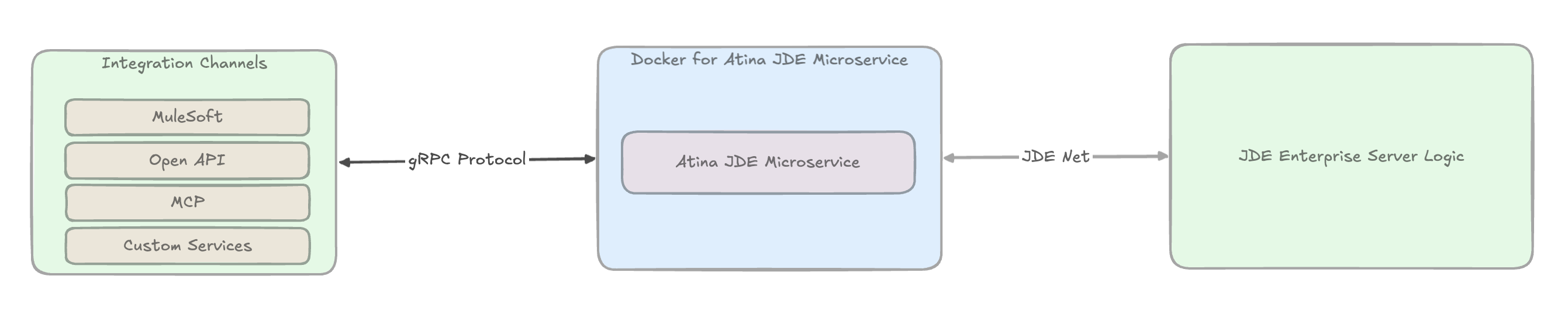
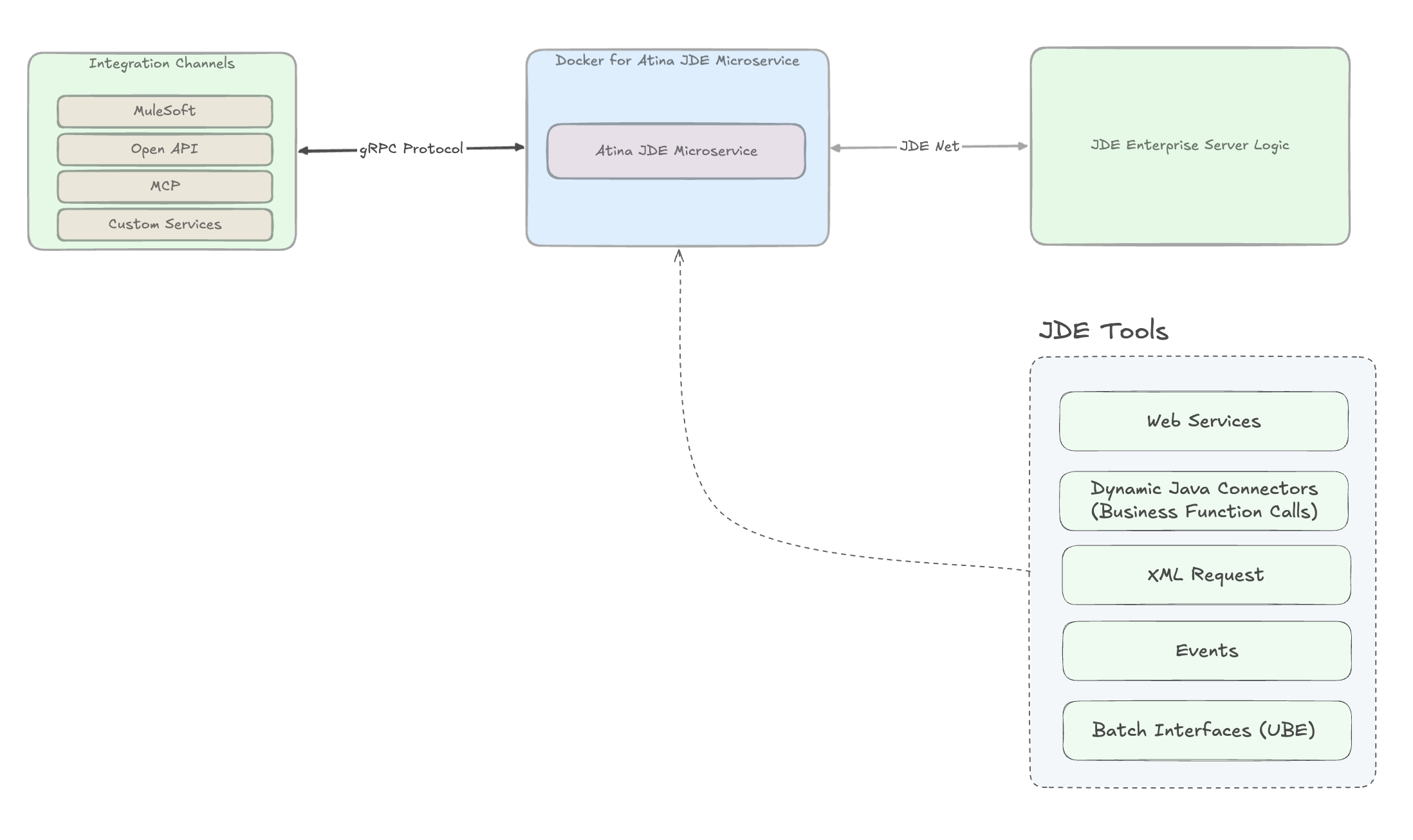
Architecture: Integration Channels → Docker/Atina JDE Microservice → JDE Enterprise Server Logic

What You Get Out of the Box

Atina encapsulates the complexity of JD Edwards integration so your team doesn’t have to rebuild connectivity for every project.

Connector capabilities: Web Services, Dynamic Java Connectors, XML Request, Events, Batch Interfaces (UBE)

Web Services

Call any JDE web service directly — no Application Server required.

Business Functions (BSFN)

Execute JDE business logic remotely, with or without transaction support.

XML Request

Process structured data requests against JDE operations.

Events

React to changes in JDE in real time.

Batch Processing (UBE)

Submit and track batch jobs programmatically, including report interconnects.

Integration Components Built on the Atina Microservice

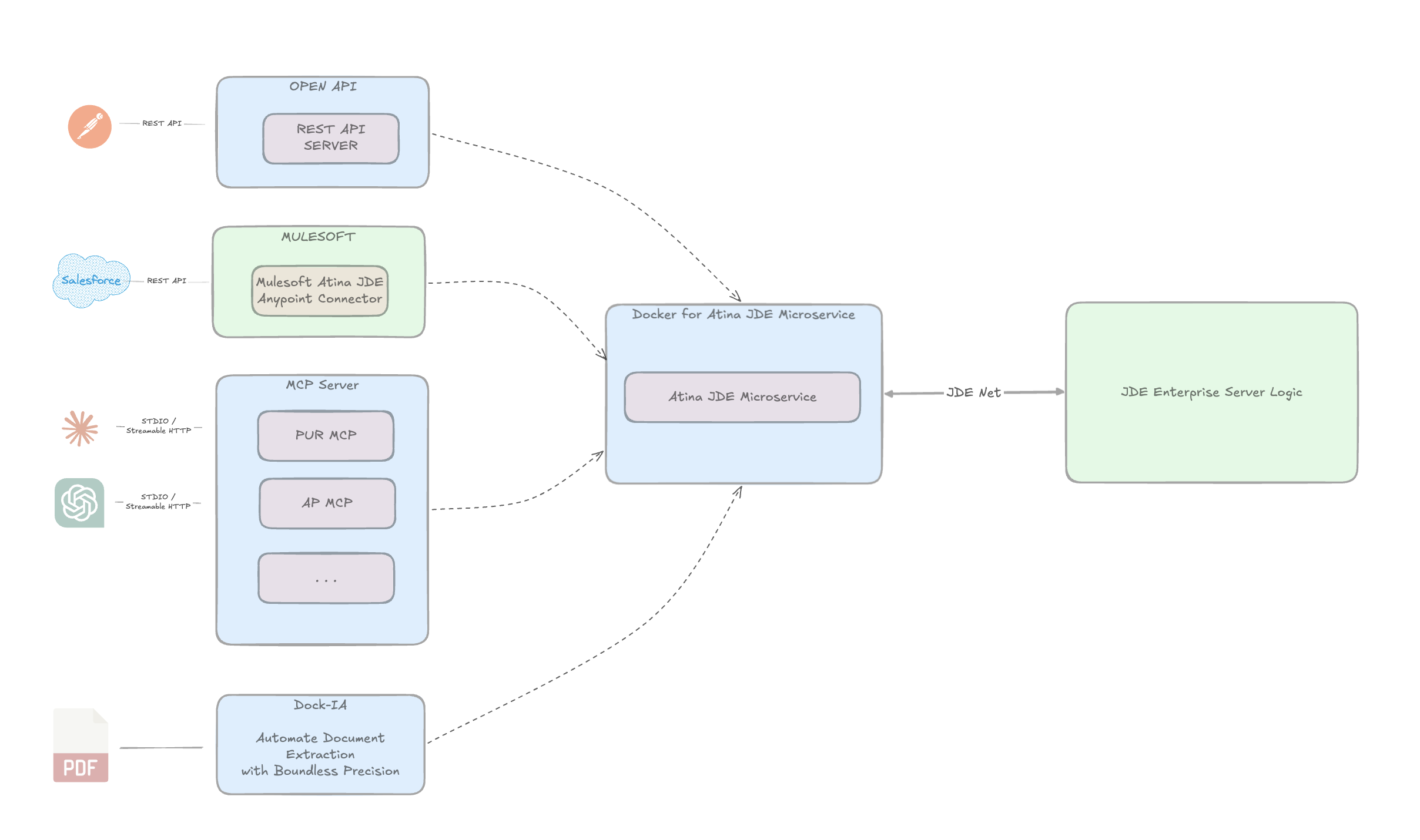
One microservice, multiple integration paths for connecting JD Edwards to modern applications, platforms, and AI agents.

Integration components: OPEN API, MuleSoft, MCP Server, Dock-IA connecting to Docker/Atina JDE Microservice

MuleSoft Connector

Reduce integration time from months to weeks with a certified, drag-and-drop connector for MuleSoft Anypoint.

  • Low-code / no-code experience inside Anypoint Studio™
  • Encapsulates authentication, error handling, and session management
  • Supports BSFN, UBE, web services, token operations, and event polling
  • Ideal for API-led connectivity and enterprise integration patterns
Anypoint Exchange

MCP Server

Let your team query and approve JDE transactions using natural language — no screens, no training.

  • Exposes curated JDE operations through Model Context Protocol (MCP)
  • Allows AI agents (Claude, ChatGPT, etc.) to call JDE safely via your Atina microservice
  • Conversational approval of purchase orders
  • Natural-language queries on JDE master data
  • Assisted data entry and validation

REST API

Expose JDE operations to any app, portal, or service through standard REST endpoints.

  • Exposes curated JD Edwards operations through standard OpenAPI-based endpoints
  • Simplifies integration for external applications, portals, and custom services
  • Ideal for modern API-led architectures and non-MuleSoft integration scenarios

Dock-IA

Dock-IA captures, validates, and integrates data from your Invoices, Orders, Purchase Orders or any PDF. We drastically reduce manual data entry and token consumption with our hybrid rule-AI engine.

www.dock-ia.com

Everything Your Integration Needs, Built In

Atina handles the full lifecycle of JDE connectivity so your team can focus on delivering business value.

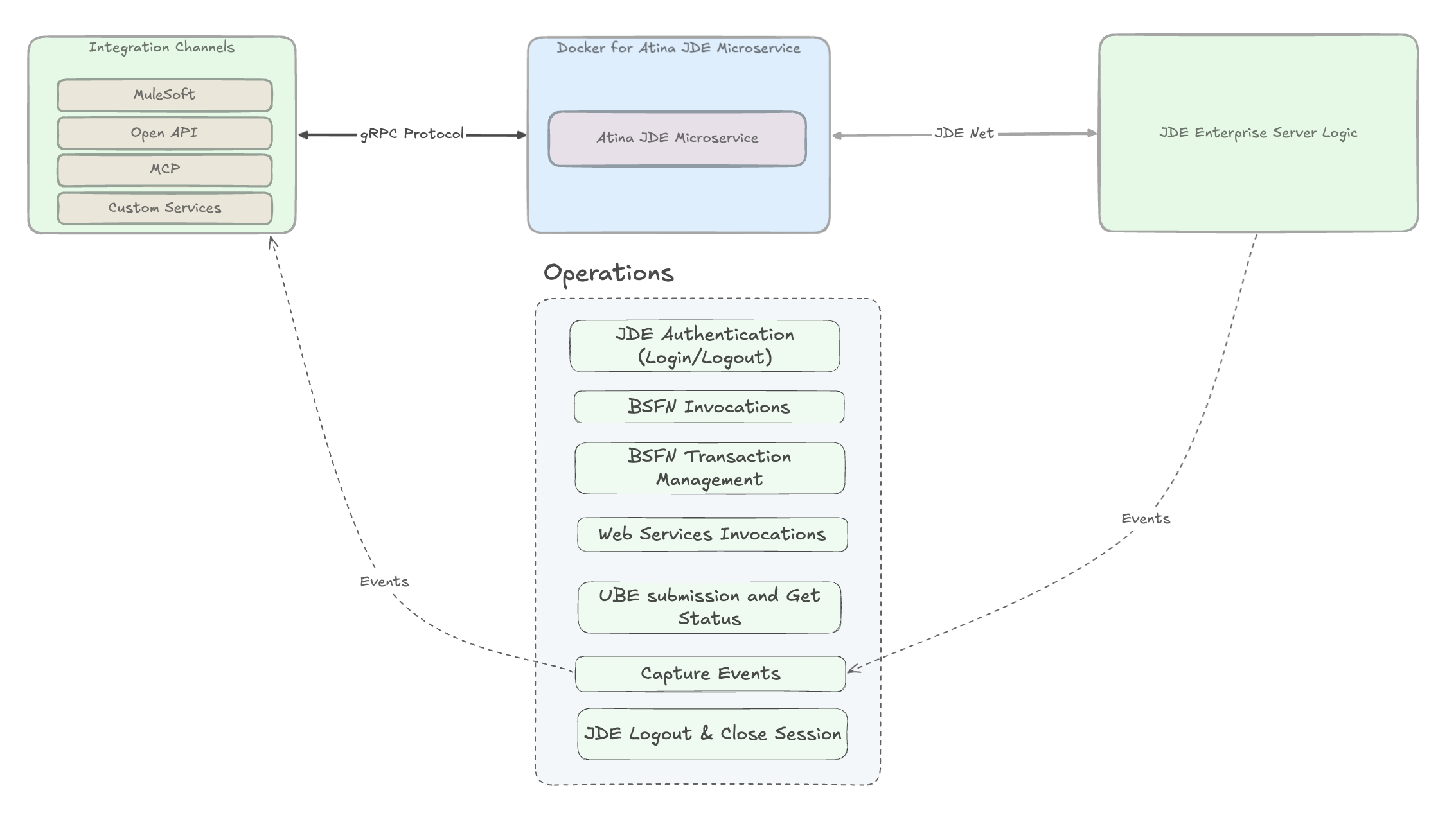
Centralized operations: Authentication, BSFN, Web Services, UBE, Events, Transaction Management, Logout

Authentication & Sessions

Secure login, session pooling, and automatic cleanup using your existing JDE credentials.

Business Functions & Web Services

Execute any JDE business logic or web service remotely, with full transaction support.

Batch Processing (UBE)

Submit, monitor, and track batch jobs with report interconnects and processing options.

Real-Time Events

Capture and react to JDE Master Business Function events as they happen.

Built for Production

Monitor, manage, and scale your JDE integrations with enterprise-grade runtime capabilities.

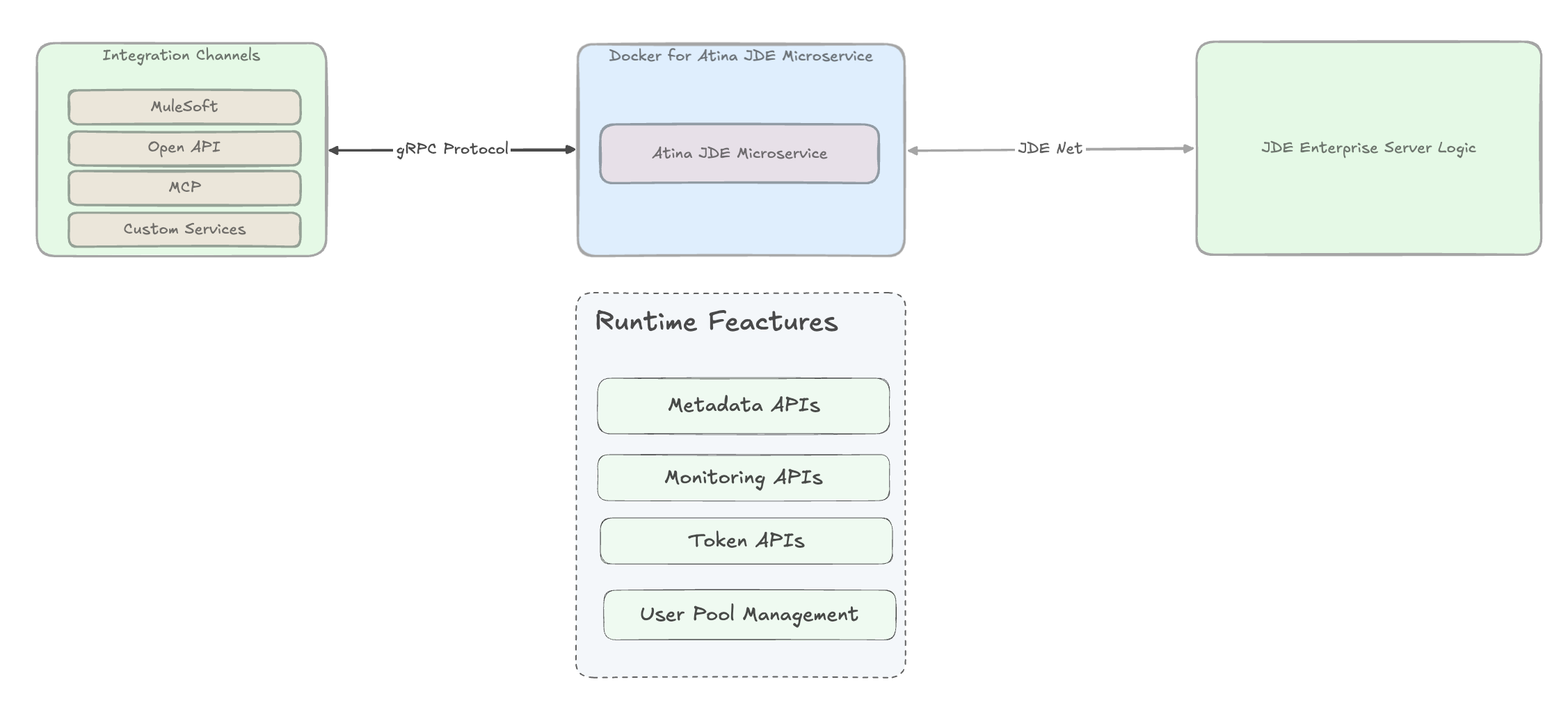
Runtime features: Metadata APIs, Monitoring APIs, Token APIs, User Pool Management

Service Discovery

Discover available JDE services, parameters, and payload examples automatically.

Monitoring & Diagnostics

Full visibility into live connections, logs, and transaction health.

Session Management

Efficient session handling at scale with built-in connection pooling.

Secure Authentication

Token-based authentication with automatic issuance and validation.

Easy Setup, Low Maintenance

Get running in hours, not weeks. Automated tools handle the complexity of JDE configuration.

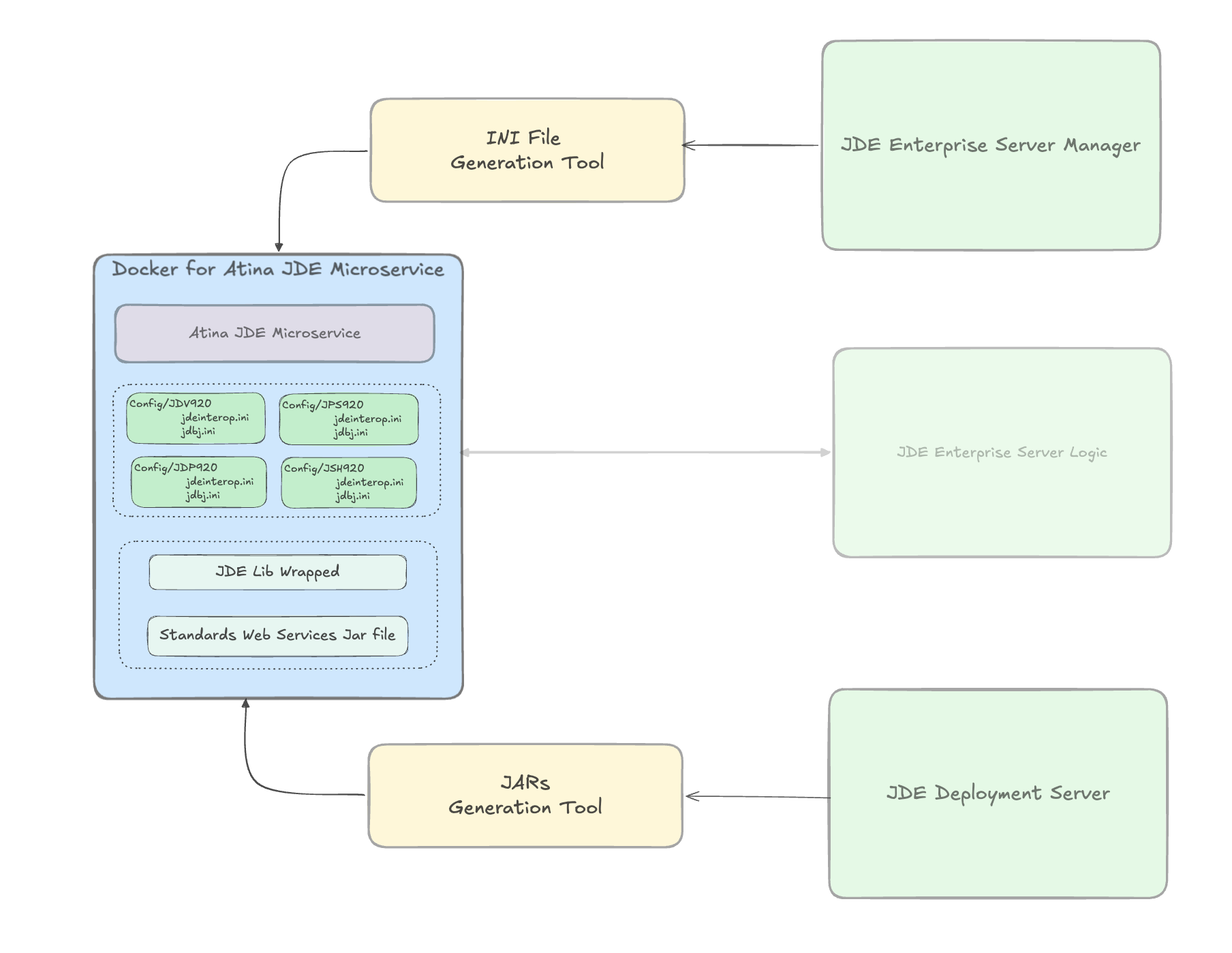
Tooling: INI File Generation Tool from JDE Server Manager, JARs Generation Tool from JDE Deployment Server

Configuration Generator

Automatically generates the configuration files required for JDE connectivity. One microservice can serve multiple JDE environments — no manual setup per environment.

Library Packager

Bundles all required JD Edwards libraries into a single deployment package. When upgrading JDE Tools Releases, only this bundle needs to be rebuilt — zero changes to your integrations.

Develop and Embed Your Own Services

Your developers focus on business logic — Atina handles the plumbing

Atina includes tools to generate JDE web service wrappers and configuration files. These tools package custom web services into a deployable bundle, which you then load into the microservice. Build once, deploy alongside the core platform.

Learn More

Ways to Get Started

Choose the level of support that best fits your team, timeline, and evaluation goals.

1

In-House Evaluation

Explore on your own

  • 30-day trial license
  • Setup documentation
  • Configuration and Q&A support
Mostly You
2

Expert-Guided POC

Validate with expert help

  • Dedicated consultant (~40 hours)
  • Define POC scope
  • Support development and testing
  • 1–2 end-to-end scenarios
You + Atina
3

Collaborative Sandbox

See it in action

  • We replicate your use case
  • We present results
  • Ideal when internal resources are limited
  • Focused POC delivery
Mostly Atina
4

Accelerated Implementation

Deliver and go live

  • End-to-end implementation
  • Aligned with MuleSoft and JDE standards
  • Design, build, configure, go-live
  • Knowledge transfer
Atina

Subscription Models, Delivery, and Support

A simple commercial framework covering licensing, delivery, support tiers, and optional services.

1

Subscription

License terms

  • 1-year or 3-year term
  • Not limited by number of JDE servers
  • Evaluation licenses available
2

Delivery

How you receive it

  • Downloadable connector products
  • Requires Atina-issued license
  • Delivered through Atina-managed distribution
3

Support

Service levels

  • Standard, Priority, and 24x7 options
  • Bug fixes, releases, and best-practice guidance
  • Unused hours may roll over by plan
4

Professional Services

Optional add-ons

  • Implementation and POC support
  • System integration assistance
  • Available as needed

Move from licensing to full delivery and support as your rollout expands.